 Hawkcrest
 CMMC Level 1 Self-Assessment: A Plain-English Checklist for Small DoD Suppliers
At a glance
- Who it applies to: DoD contractors and subcontractors at any tier who handle Federal Contract Information (FCI), but not CUI, on their own systems for a contract that requires CMMC Level 1.
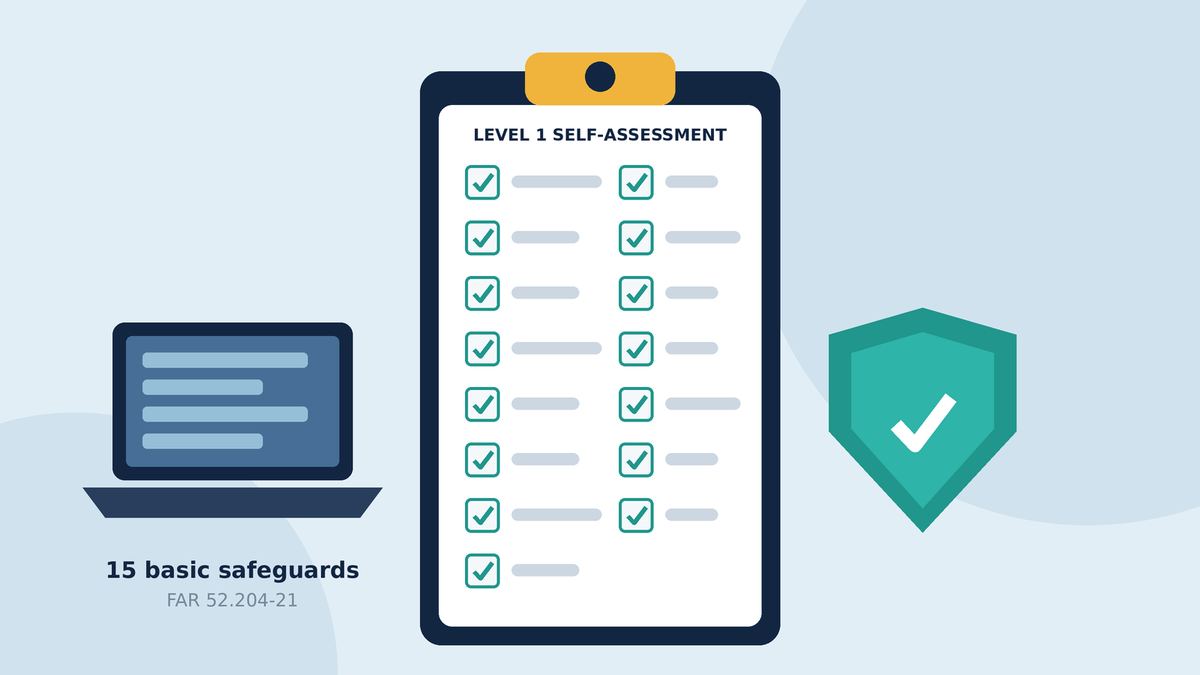
- What you check: the 15 basic safeguarding requirements in FAR 52.204-21.
- How often: a self-assessment every year, with results entered in SPRS, plus an affirmation by a senior company official after each assessment and every year after that.
- Deadline: no single calendar date. The assessment and affirmation must be in SPRS before you're awarded a contract or subcontract that requires Level 1. Level 1 has been in DoD contracts since Phase 1 began on November 10, 2025, and it remains in place while Phase II is suspended.
- Pass/fail: all 15 must be met. No POA&Ms (fix-it-later plans) are allowed at Level 1.
Download the printable checklist (PDF)
If you're a small machine shop, an engineering firm, or an IT vendor somewhere in the defense supply chain, there's a good chance a prime contractor has already asked you, "Are you CMMC Level 1?"
Level 1 is the easy part of CMMC. You assess yourself; nobody from outside audits you. There are 15 requirements, and most of them are things a well-run small business should be doing anyway.
But there's no partial credit. You redo it every year, and someone senior at your company has to sign off on it in a government system.
Who needs Level 1
CMMC applies to DoD contractors and subcontractors who will process, store, or transmit FCI or CUI on their own information systems while performing a DoD contract (32 CFR 170.3(a)).
Level 1 is the level for FCI only. If your subcontract has you handling FCI and not CUI, the requirement for you is CMMC Level 1 (Self) (32 CFR 170.23(a)(1)). If you'll handle CUI, the minimum is Level 2, which is a different and much bigger job (32 CFR 170.23(a)(2)).
So what is FCI? It's information, not meant for public release, that the government provides or that's generated for the government under a contract to develop or deliver a product or service. It does not include information the government has made public (like on a public website) or simple transactional information, like what's needed to process payments (FAR 52.204-21(a)).
In everyday terms, think of things like contract documents, statements of work, delivery schedules, or drawings and specs you received for the job that aren't public and aren't marked as CUI.
Some fine print:
- It flows down. Primes have to flow CMMC requirements down to subcontractors at every tier who will handle FCI or CUI (32 CFR 170.23). The DFARS clause also requires primes to make sure subcontractors have a current CMMC status before award (DFARS 252.204-7021(f)).
- There are limited exceptions. The rule covers contracts above the micro-purchase threshold and excludes procurements exclusively for commercially available off-the-shelf (COTS) items (32 CFR 170.3(c)). The contracting office decides which CMMC level a contract requires (32 CFR 170.3(d)), so read your solicitation.
Timing matters. Before award of any contract or subcontract that requires Level 1, you must have achieved Level 1 (Self) status and submitted your affirmation in SPRS (32 CFR 170.15(b)). Phase 1, which started putting Level 1 and Level 2 self-assessment requirements into DoD contracts, began on November 10, 2025 (DoD CIO, About CMMC).
Where do things stand right now? On July 13, 2026, the Department suspended CMMC Phase II, which had been scheduled for November 10, 2026. The official DoD CIO CMMC page says all Phase I self-assessment requirements "remain firmly in place" while a reform review is underway (DoD CIO CMMC). The details are in the memo Implementing Suspension of CMMC Phase II, which is linked from that page. Level 1 is a Phase I self-assessment, so it still applies. Watch that page for changes.
None of this is new, by the way. Those 15 safeguards have been a contract clause on their own for years (FAR 52.204-21). CMMC Level 1 adds the yearly self-assessment, the SPRS entry, and the formal affirmation on top.
First, draw your boundary (scoping)
Before you assess anything, you have to define your CMMC Assessment Scope: the systems that process, store, or transmit FCI (32 CFR 170.19(b)). The rule tells you to consider the people, technology, facilities, and external service providers that touch FCI (32 CFR 170.19(b)(3)).
- Out of scope: systems that don't process, store, or transmit FCI. There are no documentation requirements for them (32 CFR 170.19(b)(2)(i)).
- Specialized Assets: IoT and Industrial IoT devices, operational technology (OT), government furnished equipment, restricted information systems, and test equipment are not part of the Level 1 scope and aren't assessed (32 CFR 170.19(b)(2)(ii)). That's a big relief for small manufacturers with CNC machines and shop-floor controllers.
Keeping FCI in fewer places makes everything after this easier. Every laptop or cloud app you take out of the picture is one less thing to check and document.
The 15 requirements in plain English
CMMC Level 1 is exactly the 15 requirements in FAR 52.204-21(b)(1)(i) through (xv) (32 CFR 170.14(c)(2)). DoD gives each one a CMMC ID and groups them into six families.
You assess them using the objectives in NIST SP 800-171A for the matching NIST requirement, reading "FCI" wherever an objective says "CUI" (32 CFR 170.15(c)(1)). Requirement 9 (visitors and physical access) is split into three phrases in that mapping, so the official table has 17 lines for 15 requirements (32 CFR 170.15, Table 2). It's still 15 requirements.
Prefer paper? Download the printable checklist (PDF). Prefer to click through it? Try the free CMMC Level 1 self-check.
In each item below, my plain-English version comes first in bold, followed by the CMMC ID and the exact FAR wording in quotes (FAR 52.204-21(b)(1)), then the kind of proof to have ready.
Access Control (AC)
1. Only people, programs, and devices you've approved get in.
AC.L1-b.1.i "Limit information system access to authorized users, processes acting on behalf of authorized users, or devices (including other information systems)."
Proof: a current list of user accounts and company devices, with no leftover accounts for people who've left.
2. People can only do what their job needs. Day-to-day accounts aren't admin accounts.
AC.L1-b.1.ii "Limit information system access to the types of transactions and functions that authorized users are permitted to execute."
Proof: role or group lists, and a short list of who has admin rights.
3. Decide whether personal phones, home PCs, personal email, or outside file-sharing sites can touch FCI, and enforce it.
AC.L1-b.1.iii "Verify and control/limit connections to and use of external information systems."
Proof: a written rule plus the settings that back it up.
4. Make sure FCI doesn't end up on your website, social media, or a public share link.
AC.L1-b.1.iv "Control information posted or processed on publicly accessible information systems."
Proof: who's allowed to post publicly and how posts get reviewed.
Identification and Authentication (IA)
5. Everyone gets their own named account. No shared "shop" or "front desk" login.
IA.L1-b.1.v "Identify information system users, processes acting on behalf of users, or devices."
Proof: the user and device list.
6. Prove who you are before you get in. Passwords at minimum, and change default passwords on new gear.
IA.L1-b.1.vi "Authenticate (or verify) the identities of those users, processes, or devices, as a prerequisite to allowing access to organizational information systems."
Proof: your password settings and sign-in policy.
Media Protection (MP)
7. Wipe or shred drives, USB sticks, and paper before they're tossed, sold, or handed down.
MP.L1-b.1.vii "Sanitize or destroy information system media containing Federal Contract Information before disposal or release for reuse."
Proof: a disposal process and wipe or destruction records.
Physical Protection (PE)
8. Lock the server closet and the office. Only the right people have keys or badges.
PE.L1-b.1.viii "Limit physical access to organizational information systems, equipment, and the respective operating environments to authorized individuals."
Proof: a key or badge list.
9. Three things here: escort visitors, keep a visitor log, and track keys, fobs, and badges (and get them back when people leave).
PE.L1-b.1.ix "Escort visitors and monitor visitor activity; maintain audit logs of physical access; and control and manage physical access devices."
Proof: the visitor log and your key/badge tracking.
System and Communications Protection (SC)
10. Have a properly configured firewall between your network and the internet.
SC.L1-b.1.x "Monitor, control, and protect organizational communications (i.e., information transmitted or received by organizational information systems) at the external boundaries and key internal boundaries of the information systems."
Proof: firewall make and model, and its rules.
11. Anything the public can reach (a website or server you host yourself, guest Wi-Fi) sits on its own network, apart from your business systems.
SC.L1-b.1.xi "Implement subnetworks for publicly accessible system components that are physically or logically separated from internal networks."
Proof: a simple network diagram.
N/A note: If you truly have no publicly accessible systems in scope, you can mark this requirement N/A. N/A counts as met only if you document why it doesn't apply. In that case answer Yes and keep that note with your records. A website hosted by an outside company usually isn't in scope. The rule's scoring section gives that example for the matching Level 2 control, SC.L2-3.13.5, which is the same NIST 3.13.5 requirement this Level 1 item maps to, and it treats N/A the same as MET (32 CFR 170.24(b)(3), 32 CFR 170.15, Table 2).
System and Information Integrity (SI)
12. Keep up with patches for Windows, Mac, apps, firewalls, and other gear.
SI.L1-b.1.xii "Identify, report, and correct information and information system flaws in a timely manner."
Proof: patch settings and update history.
13. Antivirus or endpoint protection on your computers, and email filtering.
SI.L1-b.1.xiii "Provide protection from malicious code at appropriate locations within organizational information systems."
Proof: a console view showing which devices are protected.
14. That protection updates itself automatically.
SI.L1-b.1.xiv "Update malicious code protection mechanisms when new releases are available."
Proof: the update setting and last-updated dates.
15. Scheduled scans plus real-time scanning of downloads, email attachments, and USB files.
SI.L1-b.1.xv "Perform periodic scans of the information system and real-time scans of files from external sources as files are downloaded, opened, or executed."
Proof: scan schedule and real-time protection settings.
How each one is scored
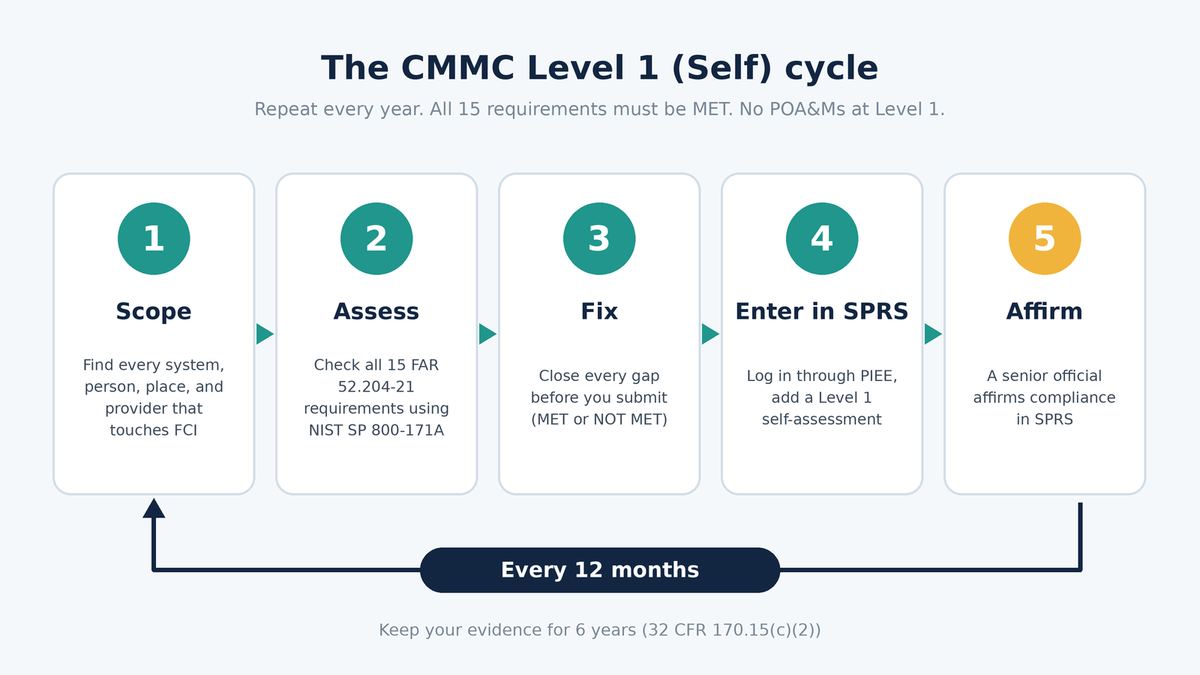
Each requirement comes out MET, NOT MET, or N/A. MET means every applicable objective is satisfied based on evidence, and that evidence has to be final, not a draft or an unapproved policy (32 CFR 170.24(b)). At Level 1, the whole assessment is MET or NOT MET. No partial credit and no POA&Ms (32 CFR 170.24(c)(1)).
Keep your evidence. The rule requires you to retain the artifacts from your assessment for six years from the CMMC Status Date (32 CFR 170.15(c)(2)).
DoD also publishes a free CMMC Level 1 Self-Assessment Guide and Level 1 Scoping Guidance with more detail on each requirement (DoD CIO Resources & Documentation).
How to submit your score in SPRS
Your results go into the Supplier Performance Risk System (SPRS), which you reach through the PIEE portal (32 CFR 170.15(a)(1), SPRS CMMC Level 1 Quick Entry Guide).
Unlike Level 2, Level 1 doesn't have a point score. The SPRS entry records a compliance result, and you need to comply with all of FAR 52.204-21 to get a "Final Level 1 Self-Assessment" (32 CFR 170.24(c)(1), SPRS Quick Entry Guide).
What SPRS needs at minimum (32 CFR 170.15(a)(1)(i)):
- CMMC level
- CMMC Status Date
- CMMC Assessment Scope
- Every CAGE code tied to the systems in that scope
- Compliance result
The steps (SPRS Quick Entry Guide, SPRS access page):
- Get the right role. The person entering the assessment needs a PIEE account with the "SPRS Cyber Vendor User" role. Your access request is reviewed and approved by your organization's Contractor Account Administrator (CAM) and the SPRS program office, which can take multiple business days (SPRS access page). Don't leave this for the week a bid is due.
- Log in at piee.eb.mil, select SPRS, then select Cyber Reports.
- Pick your company hierarchy from the drop-down. An asterisk next to it means you have the SPRS Cyber Vendor User role, which lets you add, edit, and delete. The CAGE hierarchy is imported from the System for Award Management (SAM), so it reflects your SAM registration.
- On the CMMC Assessments tab, select "Add New Level 1 CMMC Self-Assessment," enter the assessment data, and select "Continue to Affirmation."
- Affirm. If you aren't the Affirming Official, enter their email and select "Transfer to AO" to forward it to them. The Affirming Official reviews the assessment details, certifies review of the affirmation statement, and selects "Affirm."
The Affirming Official is the senior-level person who is responsible for your CMMC compliance and has the authority to affirm it (32 CFR 170.4, 32 CFR 170.22(a)(1)). For a Level 1 self-assessment, they submit an affirmation when the assessment is complete and annually after that (32 CFR 170.22). It includes their name, title, and contact information, plus a statement that you've implemented and will maintain all the requirements for everything in scope (32 CFR 170.22(a)(2)). Treat it like signing any other formal statement to the government.
Set a reminder now. You have to redo the self-assessment and submit results every year (32 CFR 170.15(a)(1)). SPRS automatically changes a "Final Level 1 Self-Assessment" to "No CMMC Status (Expired Assessment)" after one year (SPRS Quick Entry Guide). The contract clause also says a Final Level 1 (Self) status counts as current only if it's no more than one year old and backed by an affirmation that's no more than one year old (DFARS 252.204-7021(a)). Once you're on a contract, you also give the contracting officer the CMMC unique ID (UID) that SPRS issues (DFARS 252.204-7021(e)).
Common gaps we see
These are the gaps I see most often. The biggest one comes before any of the 15 requirements: nobody's sure where FCI actually lives. It might be in email, on a shared drive, in a personal Dropbox, or on a laptop at home. If you can't draw the boundary, you can't assess it (requirement 3 and 32 CFR 170.19).
After that, it's usually the everyday stuff:
- Shared logins. One account for the shop-floor PC or the front desk breaks requirement 5. Every person needs their own login.
- Old accounts and old keys. Former employees still have email access, or nobody got their key or fob back (requirements 1 and 9).
- Everyone is an admin. It's convenient until malware runs with full rights (requirement 2).
- No visitor log. Walking a visitor around is good. You also need the log (requirement 9).
- Flat network. Guest Wi-Fi or a public-facing server on the same network as the accounting PC (requirement 11).
- Drives in a drawer. Old computers and drives waiting to be "dealt with" someday, with no wipe records (requirement 7).
- SPRS access left to the last minute. Nobody can enter anything until the role request is approved by your CAM and the SPRS program office (SPRS access page).
Then there's "we do that" with no proof. MET takes evidence in final form, not a plan or a draft policy (32 CFR 170.24(b)(1)). Take screenshots. A screenshot of a setting counts as evidence; a promise doesn't.
When to bring in help
Plenty of small businesses can do Level 1 themselves, and the free DoD guides are a solid place to start (DoD CIO Resources & Documentation). It's worth getting help when:
- You aren't sure whether you handle FCI only or also CUI. That one answer decides whether you're doing a 15-requirement Level 1 or a 110-requirement Level 2 (DoD CIO).
- Your FCI is spread across lots of systems and you want to shrink the scope before you assess.
- You have a bid or a prime's deadline coming up and gaps to close fast. Remember, there are no POA&Ms at Level 1, so everything has to be fixed before you affirm.
- Your Affirming Official wants an independent second look before signing.
- You want an honest read on whether your IT setup (Microsoft 365, Google Workspace, your firewall, your antivirus) actually meets each requirement.
I'm Cory Zaner, a Houston-area cybersecurity architect (CISSP, CISM) and U.S. Air Force veteran. At Hawkcrest Cyber, I help small and midsize defense subcontractors work out their scope and check each requirement against real evidence. I stay with them through the SPRS entry and the affirmation. If you're also heading toward Level 2, see my CMMC and NIST SP 800-171 readiness service.
Want a second set of eyes on your Level 1 self-assessment before you affirm? Request a Service
Sources
Regulatory text and DoD guidance were checked against the official sources below on October 11, 2026. CMMC is under review, so check the DoD CIO CMMC page for the latest before you rely on any date.
- 32 CFR Part 170, CMMC Program (eCFR), especially § 170.3, § 170.4, § 170.14, § 170.15, § 170.19, § 170.22, § 170.23, and § 170.24
- FAR 52.204-21, Basic Safeguarding of Covered Contractor Information Systems (eCFR)
- DFARS 252.204-7021, Contractor Compliance with the CMMC Level Requirements (eCFR)
- Cybersecurity Maturity Model Certification (DoD CIO), including the linked memo Implementing Suspension of CMMC Phase II
- About CMMC (DoD CIO)
- CMMC Resources & Documentation, including the Level 1 Self-Assessment Guide and Level 1 Scoping Guidance (DoD CIO)
- CMMC Level 1 Self-Assessment Quick Entry Guide, v4.0 (SPRS)
- SPRS User Access Request (SPRS) and SPRS FAQs
- NIST SP 800-171A, Assessing Security Requirements for CUI (NIST)
- NIST SP 800-171 Rev. 2 (NIST)
This article is general information, not legal advice. Your contract and your contracting officer decide which CMMC level applies to you. Hawkcrest Cyber is an independent consultancy and is not affiliated with the Department of Defense.
Answer the 15 requirements one at a time and get a printable action plan. Runs in your browser; nothing is sent or stored.
Download the printable checklist (PDF)
Want a second set of eyes on your Level 1 self-assessment?
Request a ServiceFree newsletter
Security tips for small businesses
Free small-business security tips, every few days. Plain English, practical steps. Unsubscribe anytime.
We email you once to confirm. Your email and optional first name are used only to send these tips. See our privacy notice.