
CISO Assistant: Free, Lightweight GRC for Small Businesses
At a glance
- What it is: CISO Assistant is an open source tool for GRC (governance, risk and compliance), made by intuitem. It keeps your risks, security controls and framework checklists in one place.
- What "free" means: the Community Edition is released under the AGPL v3 license and can be run on your own server with Docker. intuitem also sells commercial editions and offers a hosted free trial.
- The honest take: a tool doesn't make you secure. It helps you write down what could go wrong, who owns each fix, and what's done, so the knowledge doesn't live in one person's head.
In many small businesses, the security plan lives in one person's memory. They know which accounts have multifactor login, where the backups go, and which vendor still needs a security questionnaire. If that person is out sick or leaves, a lot of that knowledge goes with them.
GRC tools exist to write that knowledge down in a structured way. Big companies often pay for large GRC platforms. This post looks at a free, open source option, CISO Assistant, and what a lightweight setup could look like for a small team.
Watch: the 34-second overview
Read the video transcript
Your security policy lives in one head. If that person leaves, your rules and risks leave too. A risk register lists what could go wrong and who owns the fix. A controls library ties each risk to a policy, like multifactor login. A framework checklist like NIST CSF shows what is done and what is open. Hawkcrest can set up CISO Assistant, a free open source tool, for your team. See how it works at hawkcrestcyber.com.
What is CISO Assistant?
CISO Assistant is a GRC platform developed by intuitem. The project describes it as a central hub that connects cybersecurity concepts, with built-in risk assessment and remediation tracking. One idea behind it is to keep compliance separate from security controls, so a single control (say, multifactor login) can count toward several frameworks without being entered twice.
It comes with a large library of built-in frameworks. The project's list includes NIST CSF 2.0, CIS Controls v8, CMMC v2, ISO 27001, SOC 2, PCI DSS 4.0.1 and NIST SP 800-171, among many others. Some frameworks need an extra step because of their own licensing; the project notes those in its list.
What the demo shows
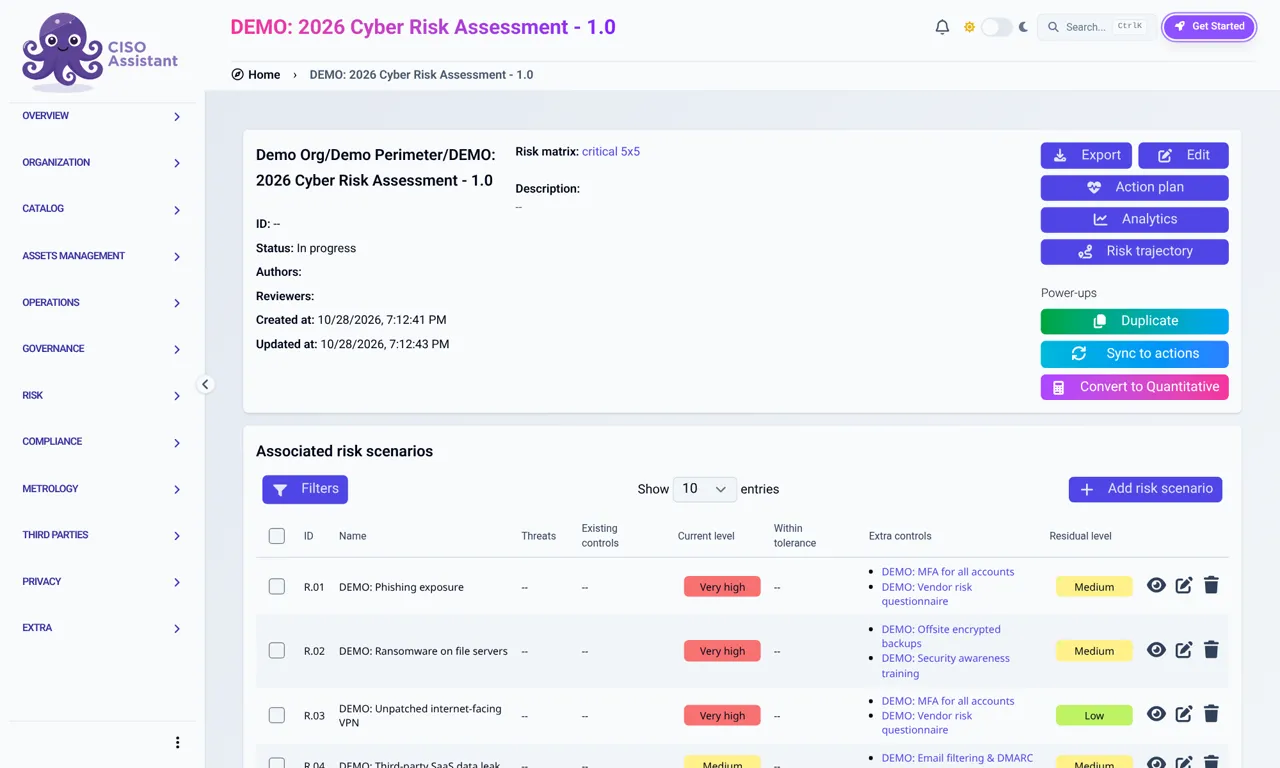
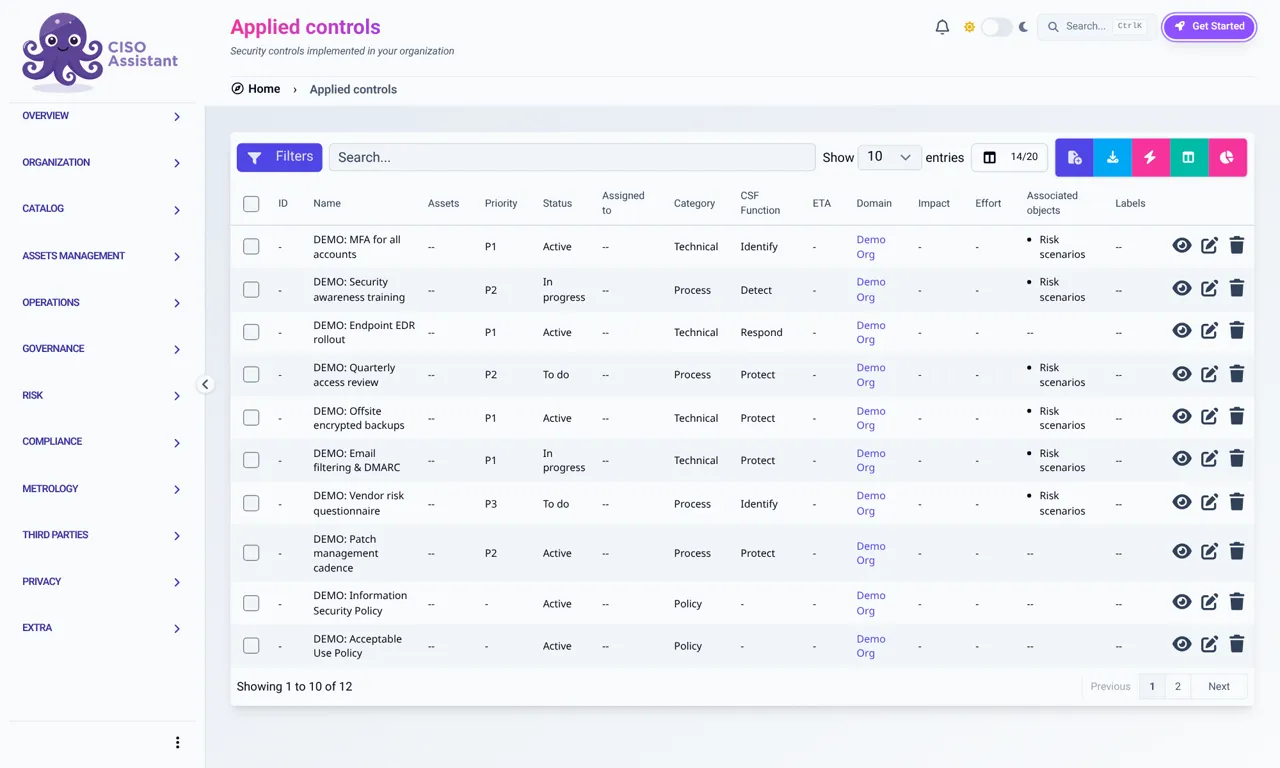
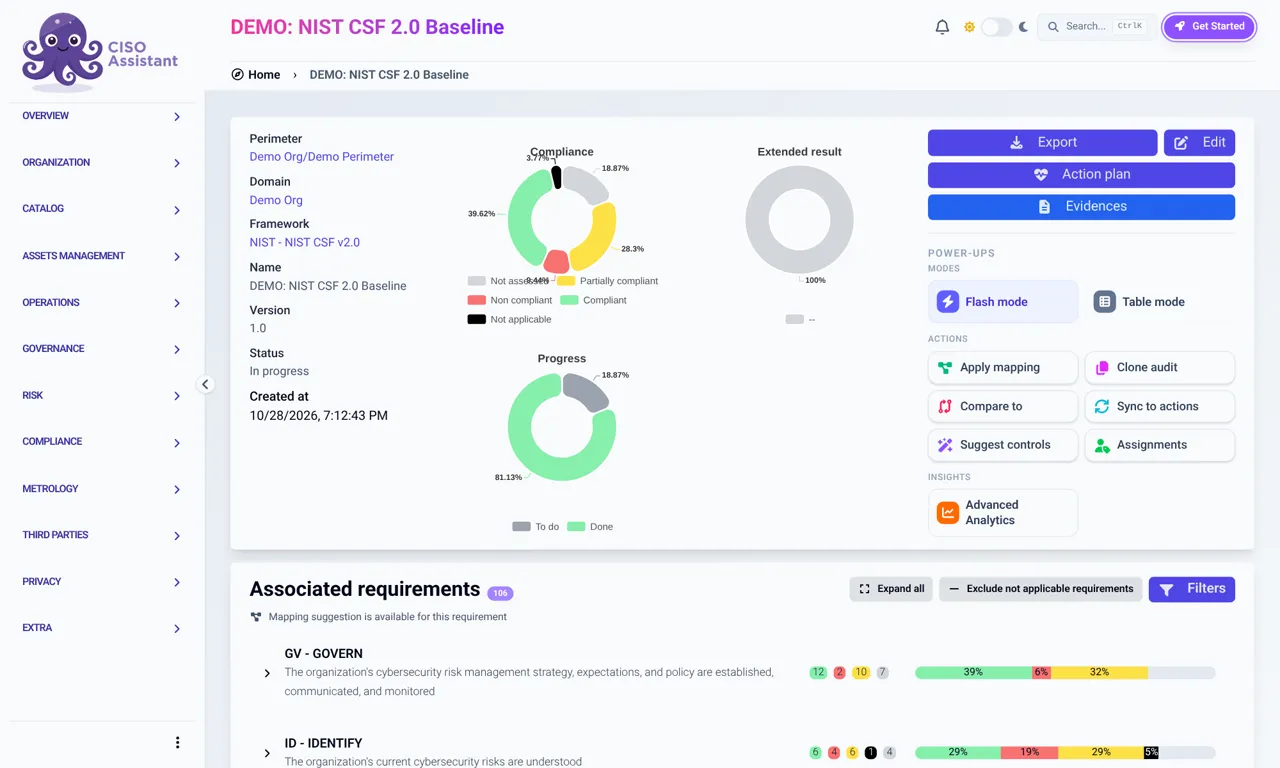
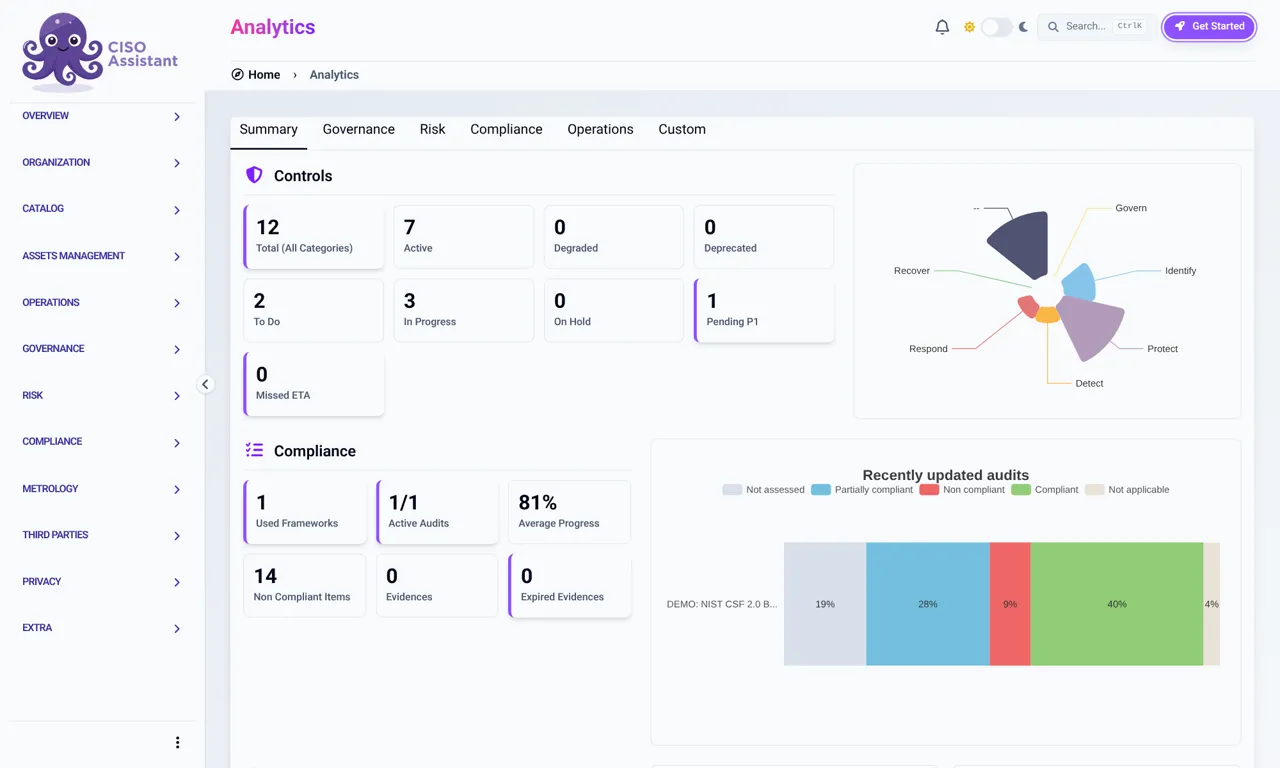
We set up CISO Assistant Community Edition in our lab and filled it with a fictional company called "Demo Org." Every item you see is prefixed "DEMO:" and none of it is real client data. Here are the four screens from the video.
1. A risk register: what could go wrong
A risk register is a list of things that could hurt the business, how likely and how bad each one is, and what you plan to do about it. In the demo, the assessment lists risks such as phishing, ransomware on file servers and an unpatched internet-facing VPN. Each one shows a current risk level, the extra controls planned to reduce it, and the level that's expected to remain afterward (the residual level).
2. A controls library: the fixes, tied to the risks
Controls are the things you actually do to reduce risk, from multifactor login for all accounts to offsite encrypted backups and a written acceptable use policy. The applied controls list shows each one's priority, status (active, in progress or to do), category and the NIST CSF function it supports. Controls link back to the risks they address, so you can see why each one matters.
3. A framework checklist: what's done and what's open
A framework gives you an outside checklist to measure against. The demo uses the NIST Cybersecurity Framework (CSF) 2.0, which groups outcomes into six functions: Govern, Identify, Protect, Detect, Respond and Recover. The audit view shows how many requirements are compliant, partly compliant, not compliant or not yet assessed, broken down by function.
4. A dashboard: the summary view
The analytics page rolls it all up: how many controls are active or still to do, how the controls spread across the CSF functions, and how far along each audit is. It's the kind of page you can show an owner or a manager without walking them through every list.
How a small business could use it
You don't need every feature. A lightweight setup could be as simple as this:
- Pick one framework. NIST CSF 2.0 is a common starting point and is free from NIST. If you handle defense contract data, CMMC or NIST SP 800-171 may matter more.
- List your top risks. Start with five to ten, in plain words, like "someone clicks a phishing link" or "we lose the file server."
- Write down what you already do. Add the controls you have today, such as multifactor login, backups or patching, and mark each as active, in progress or to do.
- Give every open item an owner. A risk with no owner tends to stay open.
- Review it on a schedule. A quick check every quarter keeps the register current and gives you a written record of progress.
Even if you never install a tool, this exercise is worth doing. A shared spreadsheet can cover the same basics for a very small team. A GRC tool starts to help when the lists grow, when several people share the work, or when you need to show progress against a framework.
What to know before you install it
- You're running a server. The project's quick start uses Docker and a starter script. Like any server, it needs patching, backups and limited logins.
- Know the license. The Community Edition is AGPL v3. Files in the repository's "enterprise" folder and the commercial images are under intuitem's commercial license, which requires a contract.
- Start small. The number of frameworks and features can feel like a lot. One framework and a short risk list is enough to begin.
- Optional AI features are off by default. In the version we tested, the built-in AI assistant isn't turned on unless you enable it and supply your own model setup. We didn't use it for this demo.
Where to learn more
- CISO Assistant Community on GitHub (README, quick start and supported frameworks)
- CISO Assistant documentation
- CISO Assistant license details
- intuitem
- NIST Cybersecurity Framework
Want a lightweight risk register and framework checklist set up for your team? Request a service and we'll help you work out what's worth doing first.
All screens in this post show fictional demo data. This article is general information, not legal or security advice for your specific situation. Hawkcrest Cyber is an independent consultancy and is not affiliated with intuitem, the CISO Assistant project or NIST.
Last reviewed October 28, 2026.
Want help getting your security plan out of one person's head?
Request a ServiceFree newsletter
Security tips for small businesses
Free small-business security tips, every few days. Plain English, practical steps. Unsubscribe anytime.
We email you once to confirm. Your email and optional first name are used only to send these tips. See our privacy notice.